How to Replace Facebook Groups for Your Direct Sales Team

Most direct sales teams run on a private Facebook group. It was free, everyone already had an account, and it got a new team talking fast. As the team grows, the same group ends up holding training videos, launch dates, product photos, recognition posts and “does anyone have the link to…” questions, all competing for one feed.
That’s usually when leaders start looking for a way to replace Facebook groups for their direct sales team. The group did a lot of jobs at once, so the replacement has to cover all of them, and the move needs a plan or reps simply stay where they are.
Why Facebook groups stop working as a team grows

The feed decides what reps see. A group post sits in the same feed as family photos, news and ads, and Facebook picks the order. An announcement about a launch date can reach part of the team and miss the rest, and nobody can tell who missed it.
Everyone gets the same posts. A rep in their first week and a leader with a large team see the same feed. There’s no clean way to send something only to new reps, or only to leaders in one state, so most posts are noise for half the group.
Training gets buried. The onboarding video from three months ago sits under hundreds of newer posts, and group search rarely finds it. When a rep does watch it, there’s no record, so you can’t see who finished onboarding and who stopped halfway.
Files live somewhere else. Product photos, price sheets and social graphics end up in a shared Drive folder, linked from a pinned post that’s out of date a month later.
Chat splits off. The real conversations move to Messenger and WhatsApp, so the group shows only part of what’s happening and leaders keep up in three places.
And it isn’t your platform. The group, its members and its reach sit on Facebook, under Facebook’s rules and Facebook’s brand. If an account gets flagged or the rules change, the team’s main channel goes with it. Every time a rep opens Facebook to check team news, the rest of Facebook is right there too.
What a replacement needs to do
Moving everyone into a general chat app fixes the feed and little else. Before you pick a tool, check it against the jobs the group was doing:
- One place to open every morning. Training, news, files, chat and the rep’s own numbers in one app, instead of a morning tour of six.
- Messages that reach the right people. Posts targeted by rank and region, so new reps get onboarding and leaders get leader news.
- Training you can track. Courses that save progress, quizzes, and a completion record you can check, ideally with a certificate the rep can share.
- A library you can search. Folders for marketing assets and resources, each shown only to the group it belongs to.
- Chat that matches your org chart. One-to-one and group conversations, including group chats built from the downline.
- Notifications that open the exact item. A tap on a push should land on the post or lesson, not the app’s home screen.
- Your brand on it. Reps should see your company’s name and colors, not a vendor’s logo.
- Room for customers. Customers need a way to reach their rep too, and a group full of reps is the wrong place for them.
How to move your team off the group
The usual way this goes wrong: the new app launches, leaders keep posting in the group “for now,” and reps stay where the posts are. These steps avoid that.

- List what the group does today. Go back a month and sort the posts into announcements, training, files, recognition and questions. Each type needs a home in the new app before launch day.
- Move the content before the people. Put onboarding into courses, files into folders, and the next few announcements in place. A rep who opens the app on day one should find something useful.
- Start with leaders. Leaders who use the app first answer their teams’ questions in it, and their teams follow.
- Set a date and say it. Pin a post in the group with the switch-over date and a download link. After that date, new announcements go to the app only.
- Give reps a reason to open it daily. A short challenge with a daily check-in and a leaderboard works well in the first weeks, because the habit forms around something small.
- Follow up with anyone who hasn’t joined. Check who has installed the app, and have each missing rep’s leader reach out directly.
- Archive the group. Once announcements stop, archive it or make it read-only so nobody posts into an empty room.
You don’t have to leave Facebook entirely. A public page or profile is still a good place for reps to post to customers and prospects. The team’s own news, training and chat are what move to the app.
Where My Empower App fits
My Empower App is a white-labeled direct selling app from D-SOL Media, built to replace the group and the apps around it (see the apps it replaces). Against the list above:
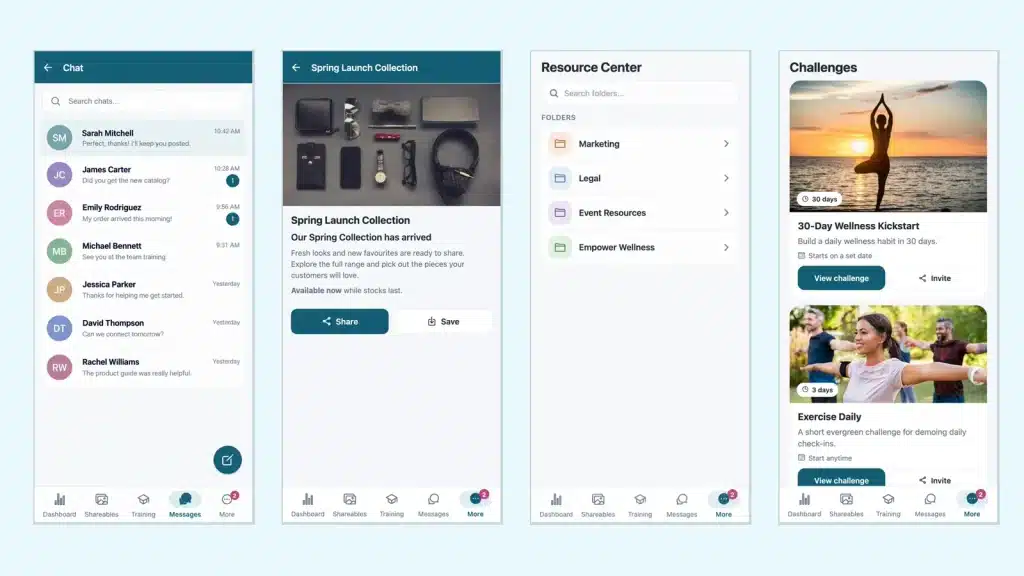
- Training: courses and multi-course Learning Paths with video and quizzes, progress that resumes where the rep left off, and certificates issued automatically on completion (see how training is tracked).
- News and notifications: posts targeted by rank, state, country or city, and push notifications that open the exact item.
- Resource Center: marketing assets in folders, searchable, shown only to the groups they belong to and in the rep’s language.
- Chat: one-to-one and group conversations, plus group chats generated from any downline filter, such as “Texas: Directors”.
- Challenges: multi-day programs with daily check-ins, points and a live leaderboard.
- My Group: app-status badges show which reps are on the app and who still needs a nudge, which covers step 6.
- Dashboards: rank progress, volume and commissions.
- Customers: a lighter customer app with chat to their rep and one tap to the rep’s website (how customers reach their rep).
- Your brand: your name, logo, colors and terminology on iOS, Android and web (see three branded apps).
To see your group’s posts, files and training in an app with your own name on it, book a demo.
See the app with your company's name on it
One white-labeled direct selling app for training, marketing, chat and a lot more. We'll walk you through it in a demo.
Book a Demo